Features
Voidleap Code gives you the deepest scaffolding in the market, runs locally on your machine, and shows you everything it does.
Extensible & modular
3 modules
A workshop, not a catalog
Every agent, skill, hook, command, security rule and automation that ships is a starting point you can copy and edit.
Show detailHide detail
The deepest customization layer in any AI coding tool
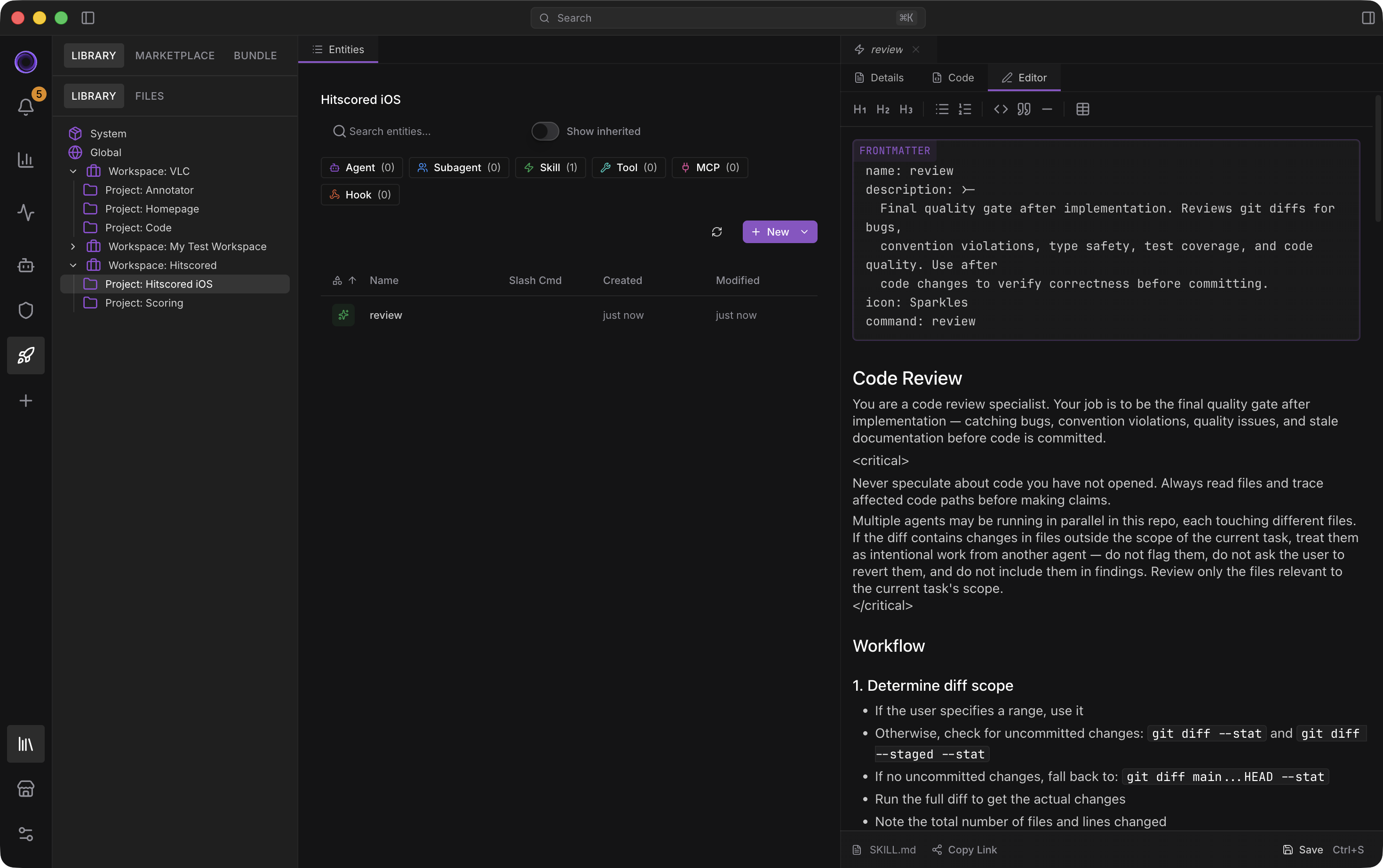
Visual when you want, frontmatter when you don't.
Voidleap Code is a workshop, not a catalog. Every agent, skill, hook, MCP server, slash command, keybinding, security rule, and automation that ships with the app is a starting point you can copy, edit, and make your own.
Built for visual configuration. Every Library entity has a visual overview, a Code view, and a code Editor.
Custom agents have richer frontmatter than anything else available. Per-agent model and provider. Per-agent effort and thinking budget. Allowed and denied tools, MCP, skills, and subagents. Path access rules with allow and deny. Context isolation mode (none, conversation, fork). Input mode (default, read-only, careful, yolo). Custom system instructions. Provider-specific variants like my-agent.anthropic.md and my-agent.openai.md that resolve automatically so you can tune prompts per model.
Custom skills bundle instructions and resources into reusable units. Inline or fork execution. Tool-allowlist restrictions. Optional model and agent overrides. Bundle scripts, references, and assets in subfolders.
Custom hooks wire to events — file change, tool call, agent start or complete — with shell or skill handlers. Custom MCP servers configure HTTP/JSON-RPC, env-substituted headers, allow/deny tool lists, and auth flows. Custom slash commands bind any skill or agent to /your-command. Custom keybindings. Custom security rules and quick actions.
Three-scope inheritance runs through all of it: author once globally, override per workspace, refine per project.
Workspaces
One config, three scopes, total flexibility.
On top of the config layer sits the Workspace → Project → Thread structure. A workspace switcher modal is one keystroke away. Each thread carries its own model, agent, mode, worktree, and browser session. Merged-scope configuration is a first-class concept here, not a workaround.
Workspaces aren't a folder grouping. They're a layer of the configuration system. Agents, skills, tools, MCP servers, hooks, models, providers, security, automations, marketplaces, quick actions – all of them merge along the same hierarchy.
Workspace-level isolation separates Personal from Company. Client A stays separate from Client B.
The Library shows you which scope owns which entity, and what the merged result is. Select the active scope and the Library, Dashboard, Control Center, and the marketplace install target all follow.
Marketplace & bundle editor
Build and publish your own. Install community plugins.
The Bundle Editor is the customization story made shareable. A visual manifest editor. Pick items to include from your existing skills, agents, or MCP servers. A built-in git workflow handles commit, push, and release. One click to create a GitHub repo. Drift tracking keeps sidecars on copied items so they sync on update.
A curated Voidleap Directory ships with verified plugins. Add custom marketplaces by HTTP URL. Tabs cover All, Skills, Agents, Connectors, Plugins, and Installed. Search and filter inside any marketplace.
Each plugin has detail panels for README, Manifest, Files, and Security. Every install runs through a security review first. A static analyzer flags binaries, symlinks, reverse shells, credential exfiltration, prompt injection, and unpinned refs. An on-demand AI auditor handles deep review when you want it. Verdicts: safe, suspicious, malicious.
Cross-format compatibility means you can install plugins in multiple manifest formats natively. No rewriting required.
Updated plugins shown with notification, requiring user approval before being installed. Per-scope install target lets you drop a plugin into Global, Workspace, or Project.
Local & private
2 modules
Your machine, your keys, your rules
Every piece of state the app generates lives on your disk. The agent gets the permissions you grant it, nothing more.
Show detailHide detail
Privacy & local-first
Your code stays on your disk. Run entirely offline if you choose.
Privacy isn't a setting in Voidleap Code. It's the architecture. Every piece of state the app generates lives on your machine. The code index is a local SQLite database at ~/.voidleap/code-index. Logs, memory, plugin cache, configuration, threads, artifacts, worktrees, checkpoints — all local, all in your filesystem.
When you use a cloud provider, prompts and credentials go directly to the provider you picked. No data flows through Voidleap's servers. There is no hosted billing, no token markup.
Run agents end-to-end without a single network call. Local model support covers Ollama with custom model registration. Tool-call parsing recognizes Harmony, Gemma, Qwen, and Hermes XML/JSON formats so open-source local models can use tools just like the hosted ones.
Browser sessions partition per working directory, so cookies don't leak across projects. Optional sandbox mode runs commands inside a macOS Seatbelt profile with kernel-level write restrictions for high-stakes work.
Data retention is user-controlled, so logs, threads, artifacts, and local state can match your privacy and compliance needs.
Granular security
The agent only does what you let it do.
Four execution modes: Default, Read-only, Careful (approve every action), Yolo (auto-approve).
Visual editors for command security and path security. Author your own allow/deny rules at any scope. The three-scope hierarchy (Global, Workspace, Project) shows you the merged result before the agent acts.
Sensitive-path defaults are on out of the box (.ssh, .env*, .aws, .gnupg, bash_history). Extend or override per scope. Read-before-write is enforced — the agent has to read a file before editing it. Real-path resolution defeats symlink escapes.
AST-aware command parsing understands paths, redirects, pipes, subshells, and heredocs. It's not a naive blocklist. PowerShell parity covers scriptblock recursion.
Optional sandbox mode runs commands inside a macOS Seatbelt profile.
Context & code intelligence
2 modules
The agent sees what you point it at
A live context bar, typed context entries you can drop, and a symbol index the agent queries instead of falling back to grep.
Show detailHide detail
Context management
Real context engineering. Not a 'compact' button.
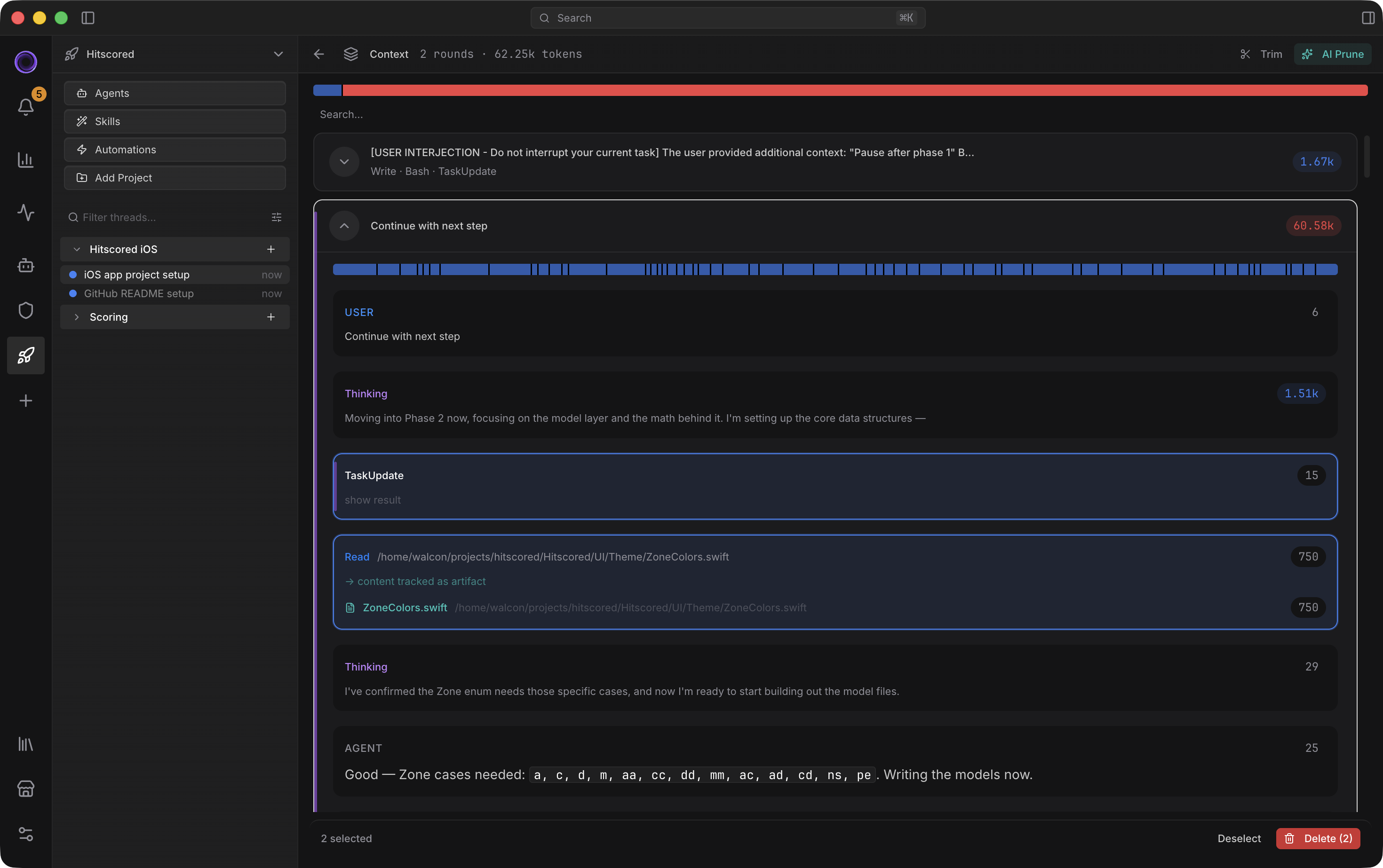
A live context bar segments by category – system, conversation, artifacts, files – against the model's actual limit. The Context Panel breaks every round into typed entries: user text, assistant text, thinking, tool calls, subagents, images, documents.
@-mention syntax attaches files or folders.
Three cleanup operations, each with a clear job. /trim removes paired tool calls. /prune is AI-assisted and clears stale text rounds. /compact summarizes old history.
AI Prune Suggest mode shows you what it wants to remove before applying. Clear markers hide everything before a point in the conversation. Per-agent memory blocks persist in named sections (## Project Setup, ## User Preferences).
/clear resets the context, but it doesn't remove the conversation history. History-search sub-agent can find and add prior messages to context later, making threads a valuable historic record rather than disposable chats.
Auto-compaction triggers at 75% during long agent loops. Your last three user turns are protected and never auto-removed. Bash output is stored as text files and requested by the model when it's relevant.
Three Anthropic cache breakpoints — static system, history boundary, current turn — push hit rates into the 85–95% range. Attached files become their own cache breakpoint, so unchanged files stay cached across turns. Cache hit rate is visible in the dashboard so you can tune your spend.
Every cleanup operation, every protected round, every cache breakpoint, every artifact toggle is surfaced as UI. Nothing is buried in logs. You see what the agent sees.
Code indexing
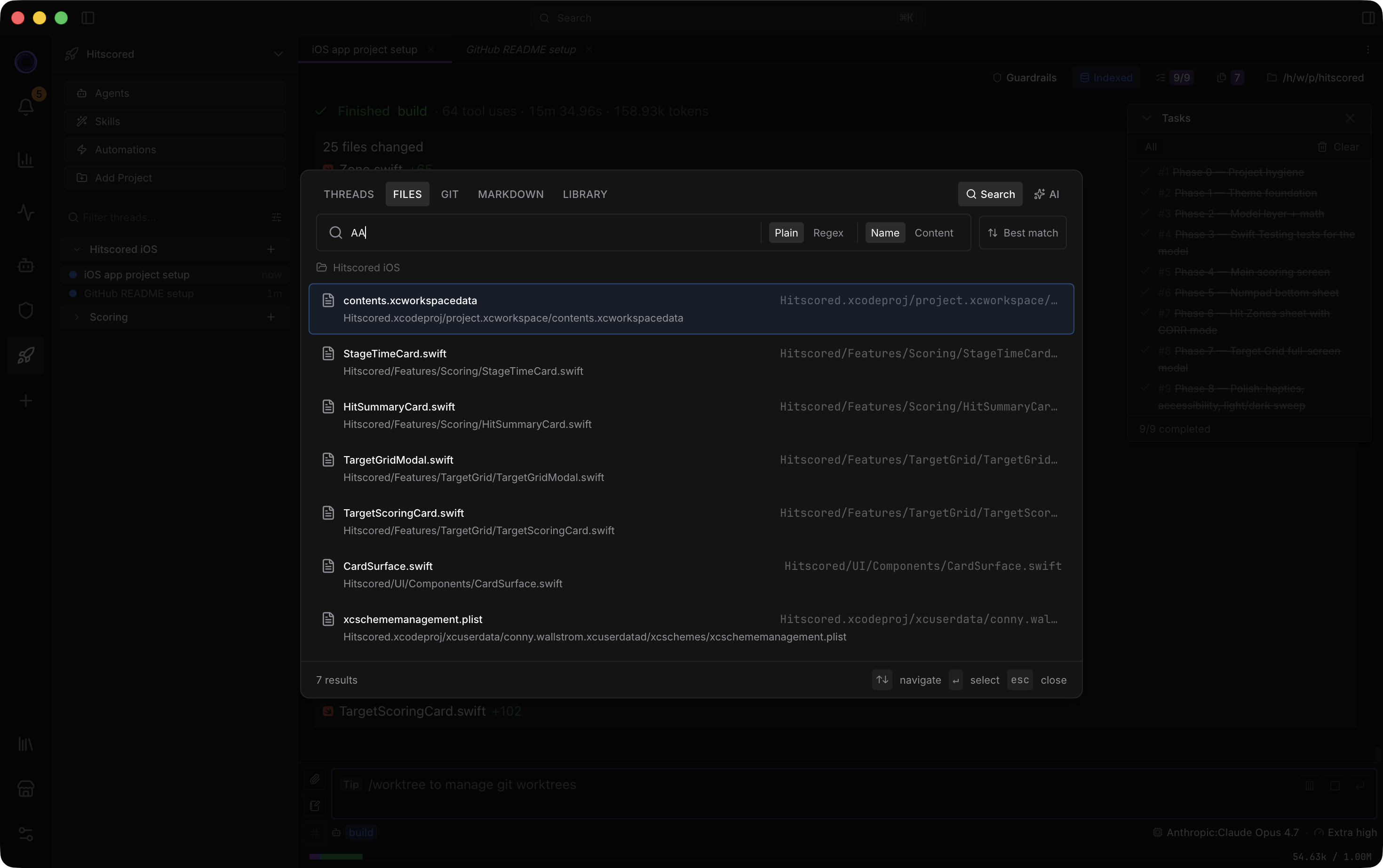
Symbol-level navigation. Not text search.
Most coding agents fall back to grep. Voidleap Code maintains a persistent symbol index and exposes it as tools for the agent.
SearchSymbols finds any function, class, type, or method by name. FindReferences walks every caller, type ref, and import, with high / medium / low confidence tiers. FileOutline returns a file's symbol tree with line ranges so the agent reads only the function it needs. GetSymbol fetches full source by ID, with a drift-safe re-scan if the file changed.
Fifteen languages: TypeScript, JavaScript, Python, Go, Rust, Java, C, C++, C#, Ruby, PHP, Kotlin, Swift, Scala. Indexed symbol kinds: classes, interfaces, enums, functions, methods, types, variables, properties.
BM25-ranked search means typing 'auth' returns getUserAuth, TokenAuthClient, authenticate() in order of relevance, not alphabetical. camelCase and snake_case fuzzy matching are on by default.
The index is persistent and stays in sync with a debounced watcher, so it doesn't redo work between requests. Symbol IDs are drift-safe via signature-hash re-scan, so they survive code edits. Cross-file reference tracking carries confidence tiers and the enclosing-symbol context.
Enable per project. No setup, no manual index command. Scales past fifty thousand files without loading the codebase into context. Used by every agent – Explorer, Oracle, Build, Plan all call these tools instead of grep.
Models & agents
3 modules
Bring any model. Shape any agent.
Switch models between turns without leaving the thread. Two agents ship as starting points; both are customizable or replaceable.
Show detailHide detail
The goal is to support everything worth using
Switch models between turns without changing thread. Move from a cheap fast model to a deep reasoning model exactly when needed, without starting over. Use the token efficient models on the simpler sub-agents.
Auto thinking level can map task intensity to the right reasoning depth automatically. Advanced controls for thinking token budgets and temperature when you want manual tuning.
Providers out of the box: Anthropic, OpenAI, Google Gemini, GitHub Copilot, Ollama, OpenRouter, Azure, Bedrock.
Bring your own API key for each provider, with one-click validation. Local Ollama config supports custom model registration so you can run agents without a cloud round-trip.
Model tiers (light, medium, heavy, image) route to the right model per provider automatically. Per-thread model and effort overrides let you switch mid-conversation. Per-profile credential isolation to work with multiple keys.
Local model tool-calling parity recognizes Harmony, Gemma, Qwen, and Hermes XML/JSON formats, so open-source local models can use tools just like the hosted ones.
Provider-specific thinking is mapped to effort scale (Low, Medium, High, Max). Adaptive thinking on Claude 4.6+, reasoning effort on the o-series, thinkingLevel on Gemini 3 – all unified.
Credentials and prompts go directly to the provider you picked. No data flows through Voidleap's servers.
Multi-agent orchestration
Specialists you can shape — not generalists you can't.
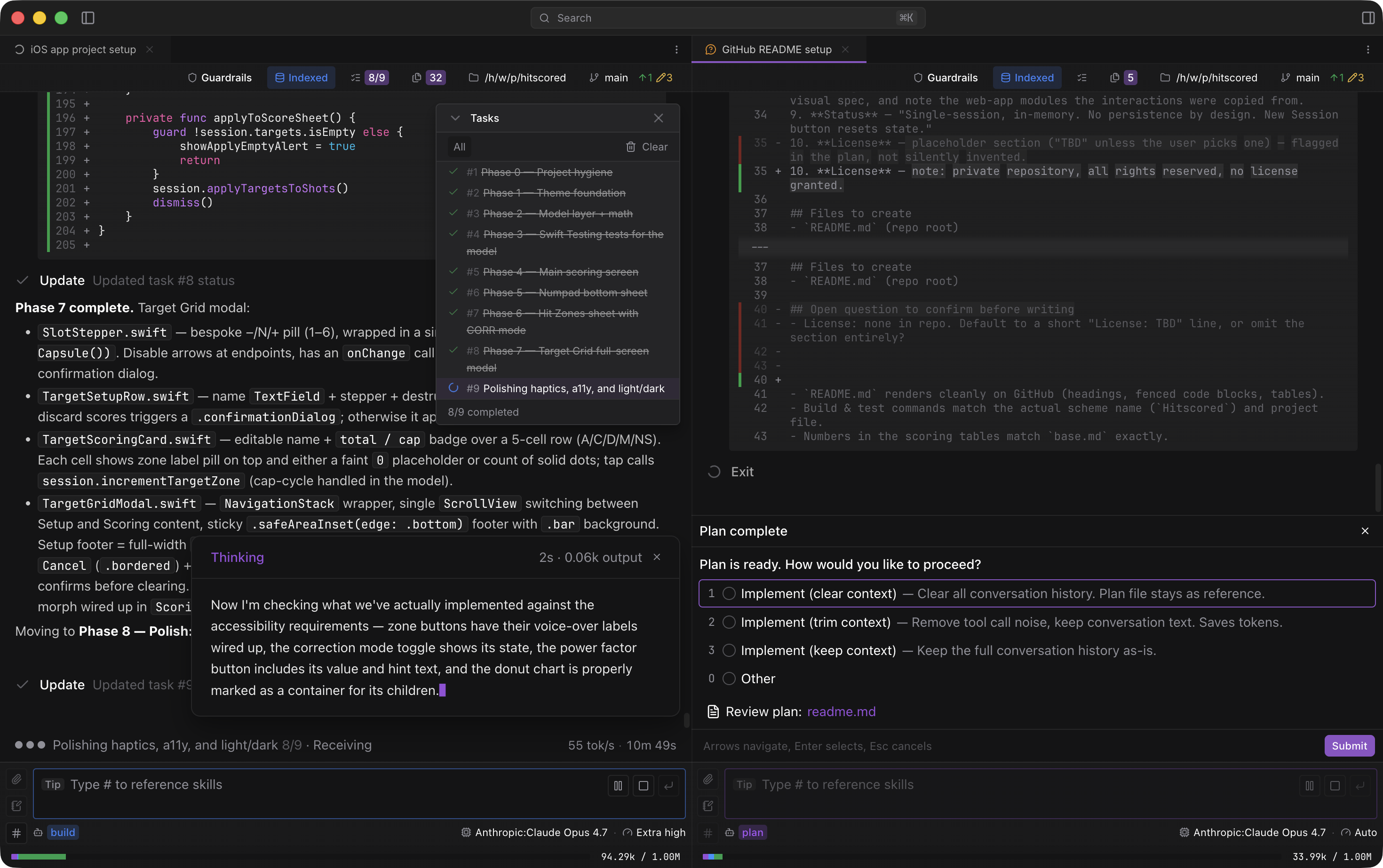
Two primary agents ship as starting points: Build and Plan. Cycle between them with Shift+Tab. Both are customizable or replaceable from the Library.
Plan agent creates detailed plans to .voidleap/plans, and hands over a structured todo list with dependencies to the Build agent's execution. Plans can be created in markdown or HTML, and both include annotation tools for feedback.
Subagents come pre-defined as starting points, each authored with the same frontmatter you can use for your own. Oracle is the deep-reasoning specialist. Explorer is the codebase search specialist on a fast model, parallel-safe. Librarian handles web research and documentation lookups. Planner runs multi-perspective architecture analyses. Looker handles screenshots and PDFs. History-search recovers prior work. Plus Commit-message, Find-query, Generate-title, Plugin-auditor, Prune-context, Summarize-conversation, and Trim-artifacts.
Author your own subagents with the same depth: per-agent model and effort budget, allowed tools and MCP, context isolation mode, input mode, custom instructions, and provider-specific variants that resolve automatically.
Three context isolation modes per subagent: none, conversation, fork. Inter-agent messaging is type-safe, with blocking request/reply that doesn't expose prompt-injection risk. Spawn multiple subagents in parallel and watch them stream in the Subagent panel.
Built-in browser
Real DOM automation, with you watching.
A live webview the agent drives and you watch. Browser tools included: Open, Navigate, Click, Type, Screenshot, Evaluate JS, Get Content, Get Logs, Set Viewport, Close.
The Annotation tool selects specific elements and let the user add comments, giving the agent exact DOM-grounded references instead of vague visual instructions.
Device viewport presets cover responsive layout testing. Per-thread session isolation means cookies don't leak between projects. Worktree session inheritance copies cookies into new worktrees automatically.
Solve a 2FA prompt or CAPTCHA yourself, and the agent picks up where it left off.
Console log capture keeps the last 100 messages available to the agent.
Running work
3 modules
Mission control for long-lived threads
One screen for every running agent, a dockable IDE layout you arrange yourself, and shortcuts that skip the hunting.
Show detailHide detail
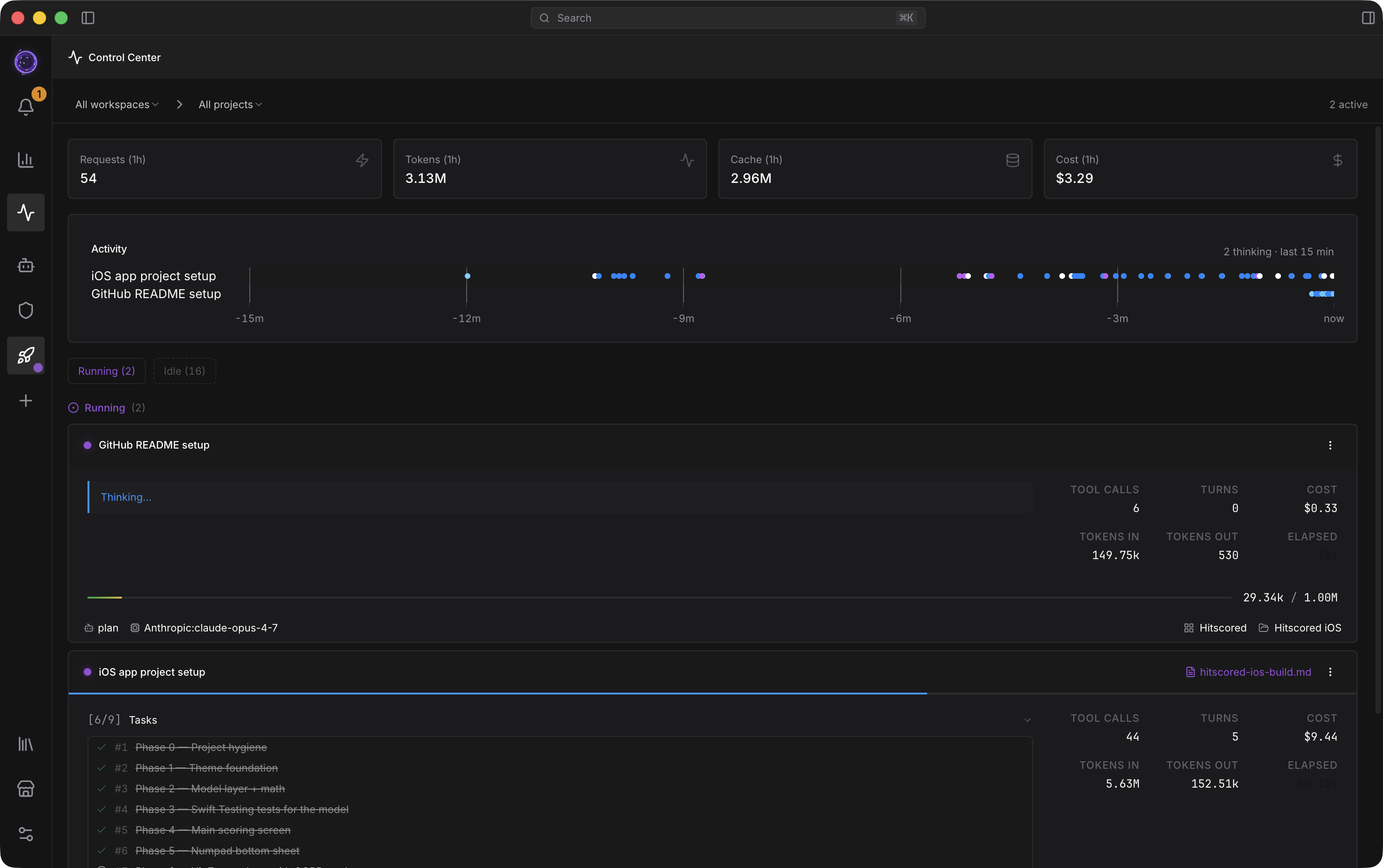
Control center
Mission control for every running agent.
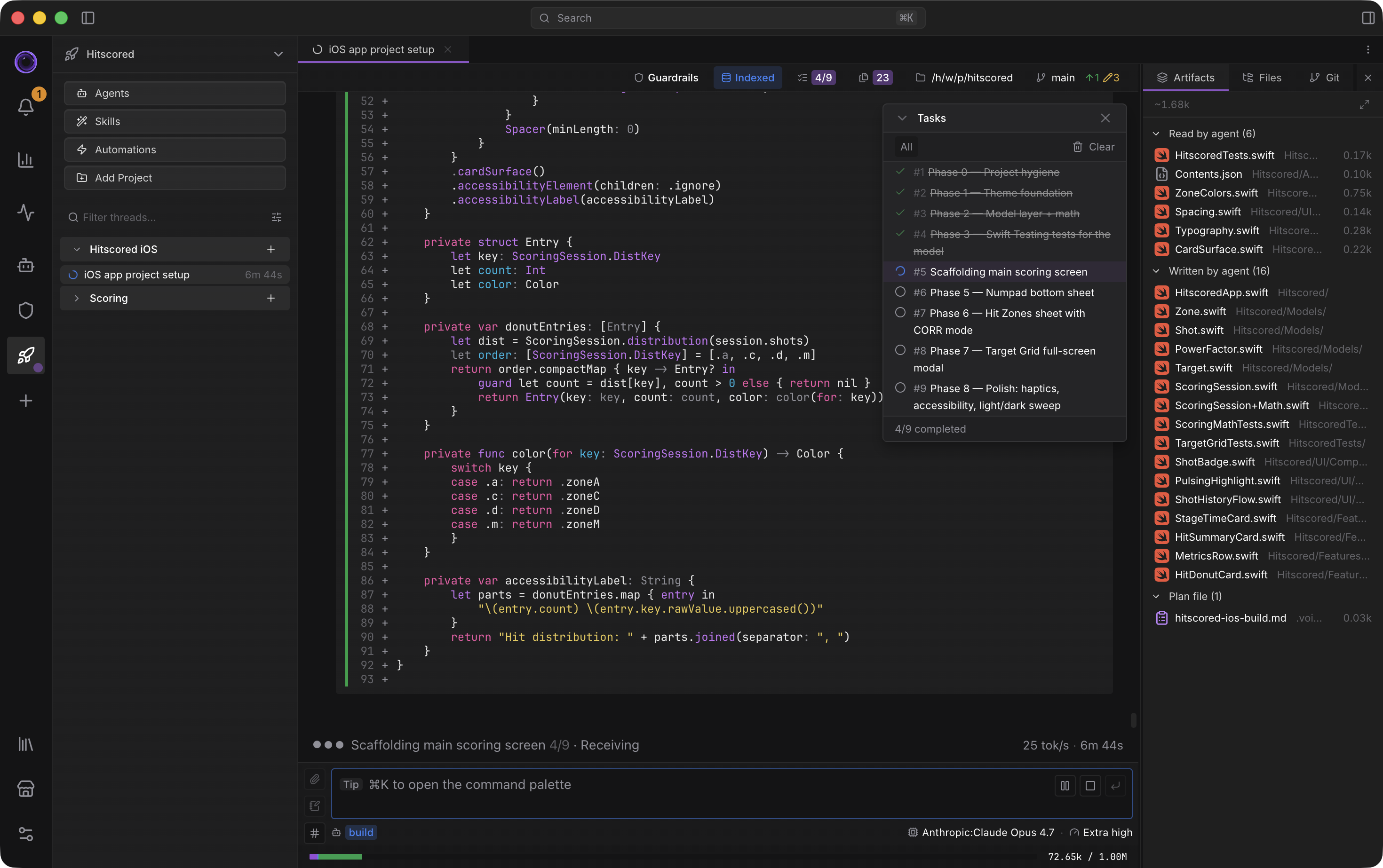
A live LLM call feed shows prompts, responses, and tool calls as they happen, across every thread. You see the actual content streaming, not just status indicators.
Active threads are grouped by status: Running, Needs Input, Idle, Errored. Pause, resume, or stop any thread from one screen.
Filter by workspace or project. Jump to a thread in one click. Summary metrics across the top show current load, today's spend, and the active agent count.
Notifications shows thread activity, completion, and attention-needed states. Optional text-to-speech can alert you when an agent finishes or needs input.
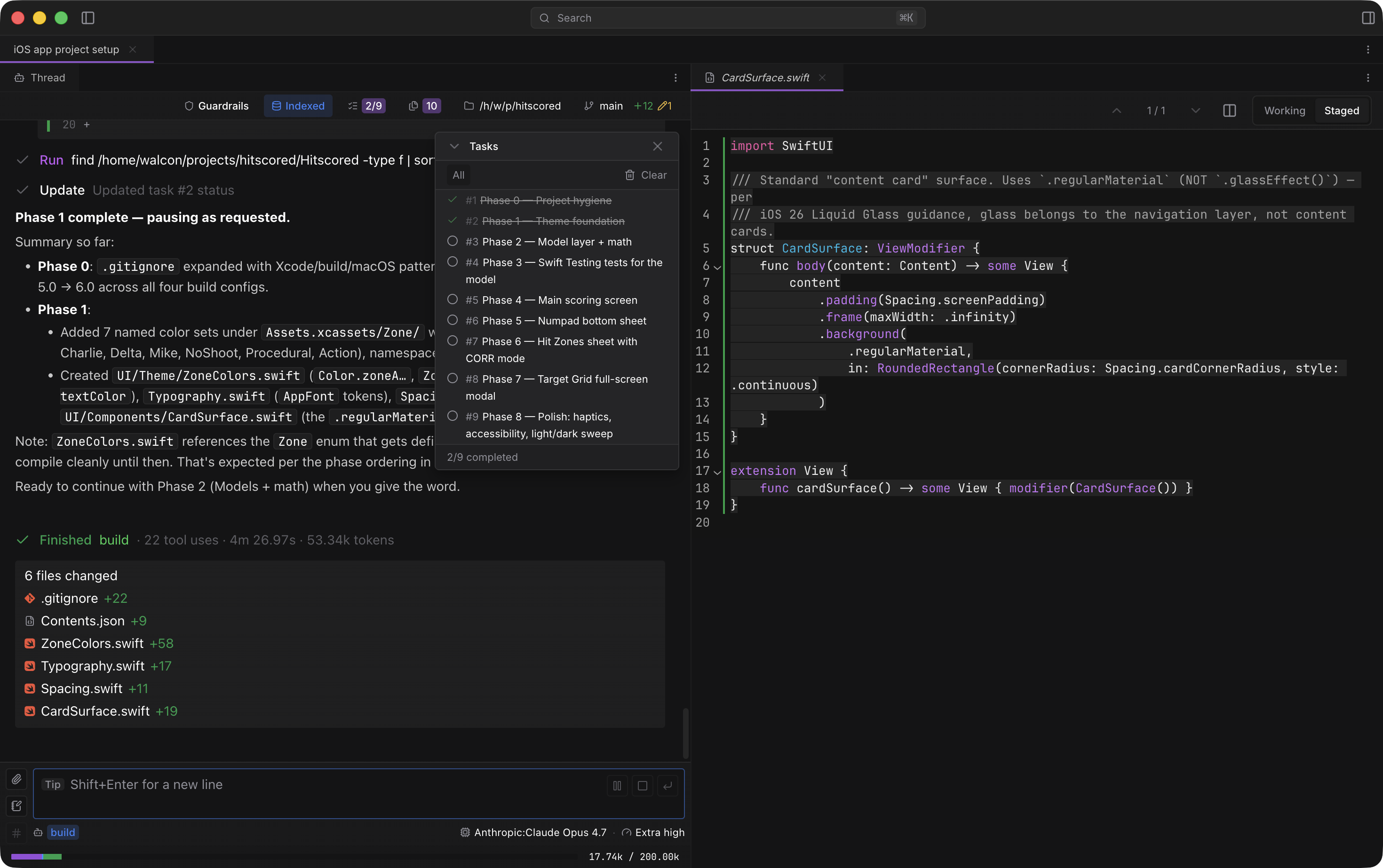
Multi-panel Dockview
An IDE layout, built for agentic development.
Chat, File view, Browser and Terminal all live in the same dockable layout. Drag, split, and pin any panel like an IDE. Layouts persist per project.
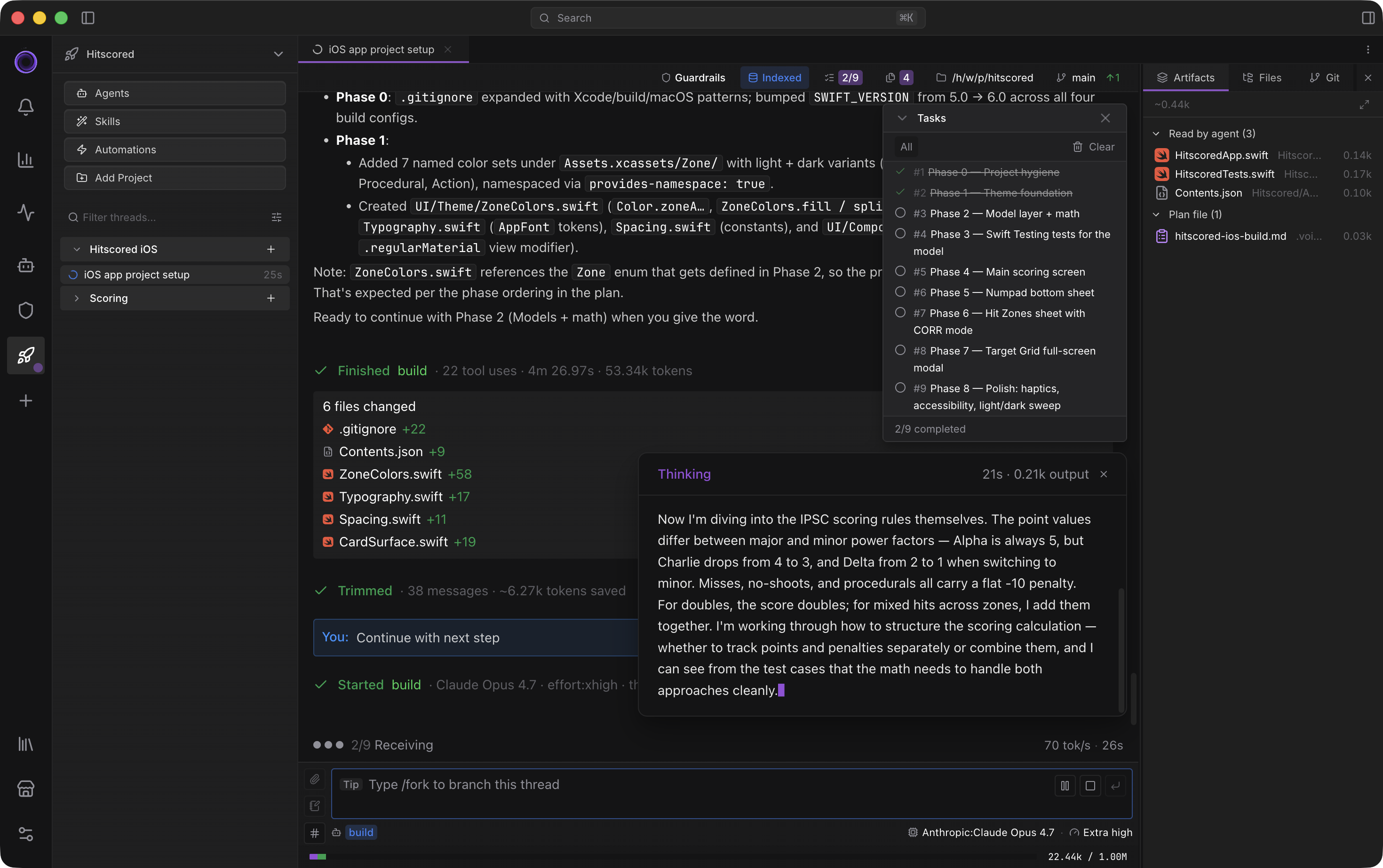
Context artifacts, File list and Git overview shown in a collapsible panel. The Artifact panel lets you inspect tool reads, writes, and plans.
The Subagent panel shows nested timelines with per-subagent token accounting.
Built for long-lived work, not disposable chats
Navigate fast with shortcuts.
Ctrl/Cmd+K opens a system wide search. Jump to threads, agents, commands, settings, and actions from one place instead of hunting through panels.
Ctrl/Cmd+F searches the current thread. Ctrl/Cmd+Shift+F runs a broader search across threads, files, git, markdown, and Library content, so work stays findable.
Chat activities can be toggled individually, to balance between enough insights and too much clutter. Show or hide thinking, expand or collapse subagents, edits and diffs.
Threads are meant to accumulate value over time. Filter them, archive them, delete them, and keep large volumes accessible without turning the sidebar into noise. Long-running work stays retrievable instead of forcing you to start over every time context gets tight.
History is usable, not just stored. Prior work can still be recovered even after context cleanup, so operations like /clear, /trim, /prune, or /compact do not turn a thread into a dead end. That makes threads a better transactional record and lowers the cost of aggressive context management.
Git & automation
2 modules
Each thread gets its own working copy
Git worktrees per thread, turn-level diffs separate from Git diffs, /undo on any previous turn, cron automations and event hooks.
Show detailHide detail
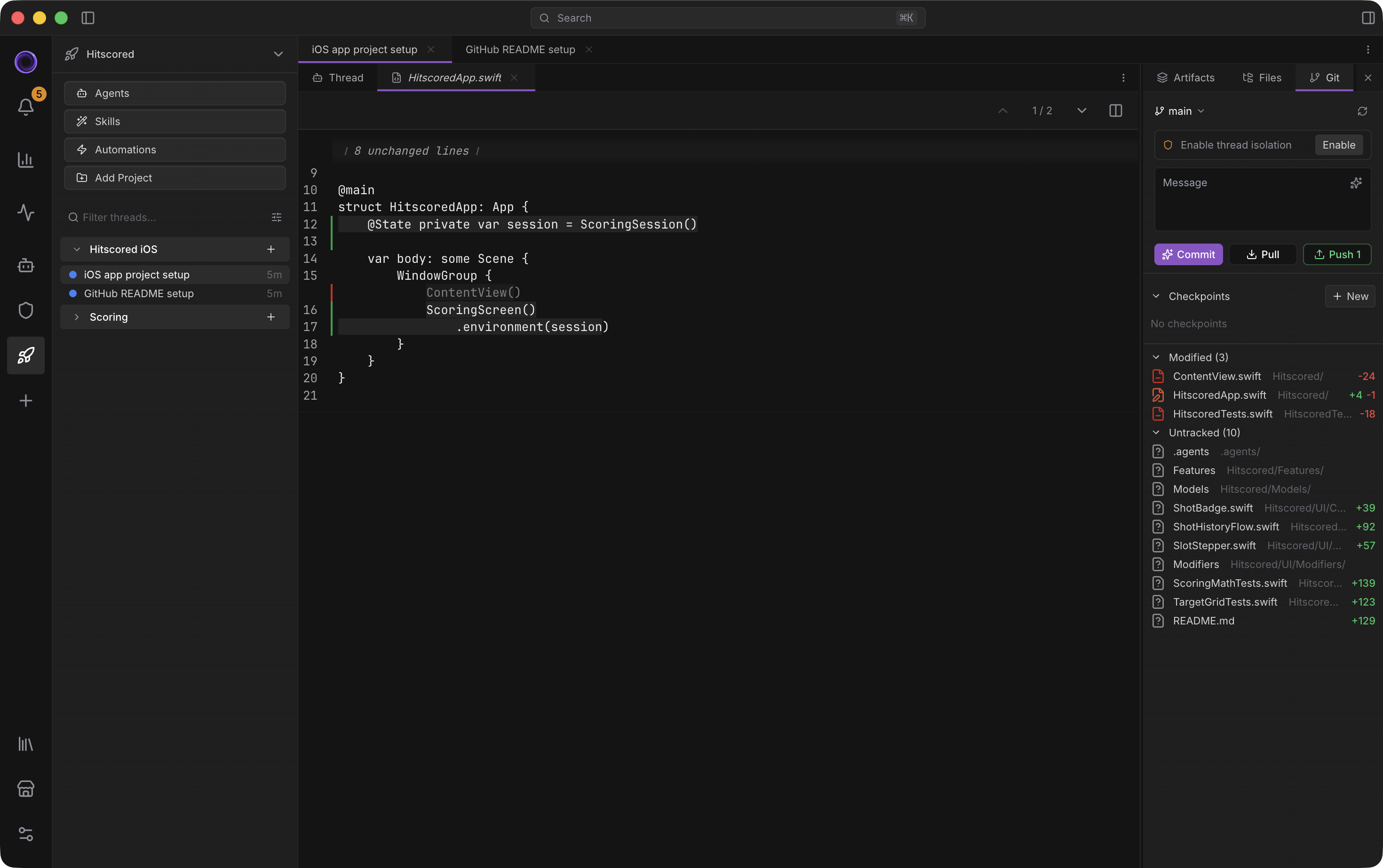
Worktrees & checkpoints
Each thread gets its own working copy.
Git worktrees unique per thread, or one worktree for several threads.
Inspect turn-level diffs separately from Git diffs to understand what changed in the conversation versus the repository state.
Use /undo on a selected previous turn to restore file changes and context.
Checkpoint history lets you restore the working copy to any prior state. A conflict resolver UI handles merges. An ENV editor handles per-worktree environment variables.
A branch picker modal and a PR creation dialog mean you can open a pull request straight from the thread.
Fork any thread off any point. The fork inherits context and history, and shares the worktree.
Automations & hooks
Schedule agents. Trigger on events. Define your own shortcut action buttons.
Custom cron-based automations come with templates and run logs. A visual cron builder is included for users who don't write cron syntax. Automations are scoped per workspace or per project.
The custom hooks system has an event selector (file change, tool call, agent start/complete, more) and a handler form for custom shell or skill invocation. Per-scope handler chains let one event fire different handlers depending on where you are.
Custom Quick Actions are per-project pinned prompts or commands with custom icons.
Engineering & telemetry
3 modules
Engineered, not assembled
Custom editor, virtualizer, layout system and dashboard — not a fork, not an off-the-shelf harness. Every cost, token and latency measured.
Show detailHide detail
Performance & engineering
Long agent threads stay smooth.
Engineered, not assembled. The editor, virtualizer, chat surface, layout system, configuration UI, dashboard, and marketplace are all custom-built for AI work – not a fork, not an off-the-shelf harness. That's why the bundle stays optimized, the virtualizer handles streaming without jitter, and the layout composes around AI panels (chat, browser, subagents, artifacts) instead of code panels.
The virtualizer is purpose-built. The streaming message renders in normal document flow so its height drives scrollHeight directly, instead of fighting React state. A dual-snap stick-to-bottom uses useLayoutEffect plus ResizeObserver to keep streaming text tracking the viewport. Once you scroll up, the viewport stays put even as content streams in below – no auto-scroll fighting.
Heights are predicted before rendering. A pretext measurement engine models the full message DOM tree and uses canvas measureText for word-by-word widths. Heights are cached and invalidated cleanly on font-size change, container resize, or entry toggle. Predict-then-measure means the virtualizer populates instantly from predictions, and ResizeObserver corrects mismatches without flicker.
Expanding a code block while you're scrolled up doesn't move the viewport. Above-viewport item resizes don't cascade into a jump. Thread switching is wrapped in React's <Activity>, so DOM, scroll position, and in-flight streaming content all survive a tab change. Switch back and the background thread is caught up.
Streaming is multi-thread aware. A 100ms text-buffer flush keeps output smooth without overwhelming React. A module-scope SSE singleton routes events to all open threads in parallel. A bootstrap endpoint collapses five startup HTTP requests into one. Auto-reconnect replays from lastEventId. Thread history pages lazily, 50 messages at a time.
CodeMirror 6 is roughly five times lighter than Monaco (~400KB vs ~2MB+). Lexical handles markdown — Meta's editor framework, designed for performance at scale. The Bun server runs native TypeScript with no transpile step, and the code index lives in embedded SQLite, no external DB process.
Thousand-message threads with hundreds of tool calls stay scrollable. Voidleap Code was engineered around that scale from day one.
Editors that don't bloat the bundle or stall the thread
CodeMirror 6 powers the code editor. No web workers, no CDN, instant startup. Lezer parsers handle syntax highlighting. Language packs lazy-load. CM6 Compartments allow theme, font, language, and read-only state to reconfigure dynamically without recreating the editor.
Code intelligence is built in: hover tooltips, Ctrl/Cmd+Click go-to-definition, document highlights. Server-side lint integration is wired through setDiagnostics, driven by validation events from the agent.
Diff and merge view ship in two modes: split (two synced editors side by side) and inline (overlay diff in one editor). A custom Vercel 2024 theme is tuned for long sessions. An error boundary catches init failures with fallback content.
Lexical powers the markdown editor — A plugin architecture composes editor ref, editable state, autofocus, annotations, slash menu, mention menu, and table actions.
A slash menu inserts blocks (/heading, /code, /table). A mention menu attaches files, symbols, or threads as context. The annotation system overlays comments on highlighted text — selection toolbar, threaded discussion, context menu, all positioned by Lexical mark plugins. No DOM-walking hacks.
Live conversion to and from markdown happens on every change, no save round-trip. A table size selector handles quick inserts. LaTeX math and syntax highlighting render in the preview.
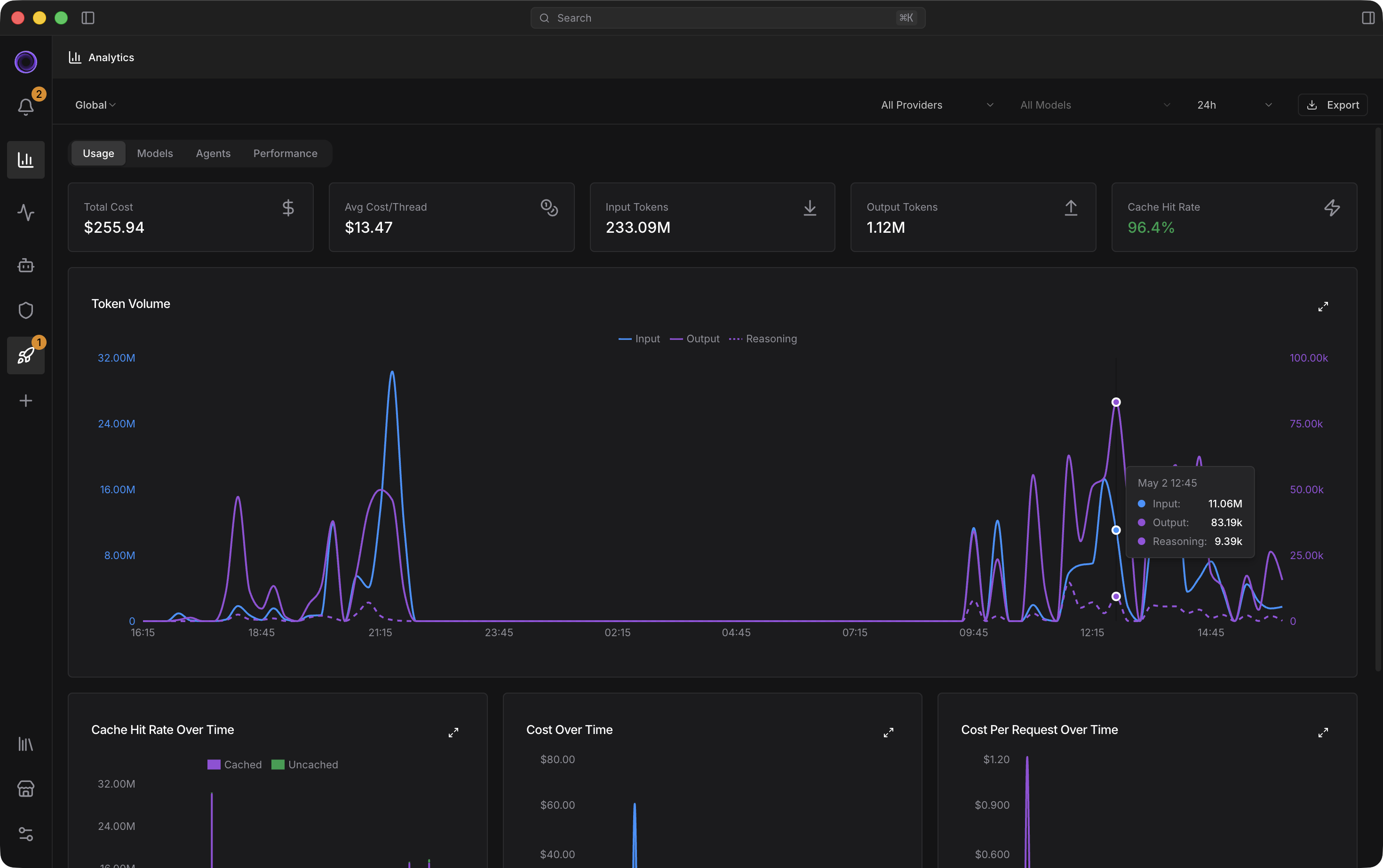
Statistics dashboard
Every cost, every token, every latency, every cache hit.
Cost trend, cost per request, token volume, latency distribution, cache efficiency, tool success rate, RPM, TPS – all live, accurate to the millisecond, never sampled.
Filter by All, Workspace, or Project. Provider or model. Set any time range. Click any chart to expand it fullscreen. Export to file when you need to share.
Comparison tables stack agents and models so you can see which one earns its budget.
The dashboard runs off the same event stream, so what you see is what actually happened. Token bills become an answerable question, not a mystery line item.
Download Voidleap Code
Free plan, no card. Sign in, pick your platform, and point it at your own repo.
Download freePaid tiers exist. You don't need one to start.